Article Contents:
Executive Summary
Visitor Management extends Avetta’s Worker Management platform to manage all site visitors — including contractors, vendors, and guests. This module ensures every individual on-site is tracked, advancing Avetta’s vision of a comprehensive site presence management system.
Industrial facilities track Worker and Supplier compliance through Avetta’s Worker Management platform, but vendors, visitors, and one-off service providers are processed through another system, creating blind spots in site safety and fragmented audit trails. Visitor Management aims to close this gap, ensuring all visitors on site are accounted for.
Permissions
Permissions need to be applied for each user at desired locations who need access to the hub. Contact your Account Manager or Client Success Manager to enable and for setup information.
Feature Applicability
Globally available for all Clients using Worker Management.
Check In Process
Visitor Management ensures a streamlined check-in process for visitors.
- A self-service kiosk allows visitors to log in using a tablet (self-provided, iPad or android) or mobile device and can be deployed at any entry point.
- A screen prompts visitors to check in by entering their name, email, phone number, and associated company.
- The hub integrates with common label printers, enabling badges to print immediately and keeping check-in under 60 seconds.
- NOTE: You provide your own devices and printers for all entry points.
Terminal Initialization
You are responsible for activating each entry point hub once a system administrator enables Visitor Management.
To initialize the terminal:
- Go to: https://worker.avetta.com/index.pl?pg=Visitor
- A screen will show the terminal is not initialized.
- Select Click here to setup.
- Log in using Worker Management admin username and password.
- Select the terminal to initialize.
- Repeat as needed for all terminals.
Managing Visitors
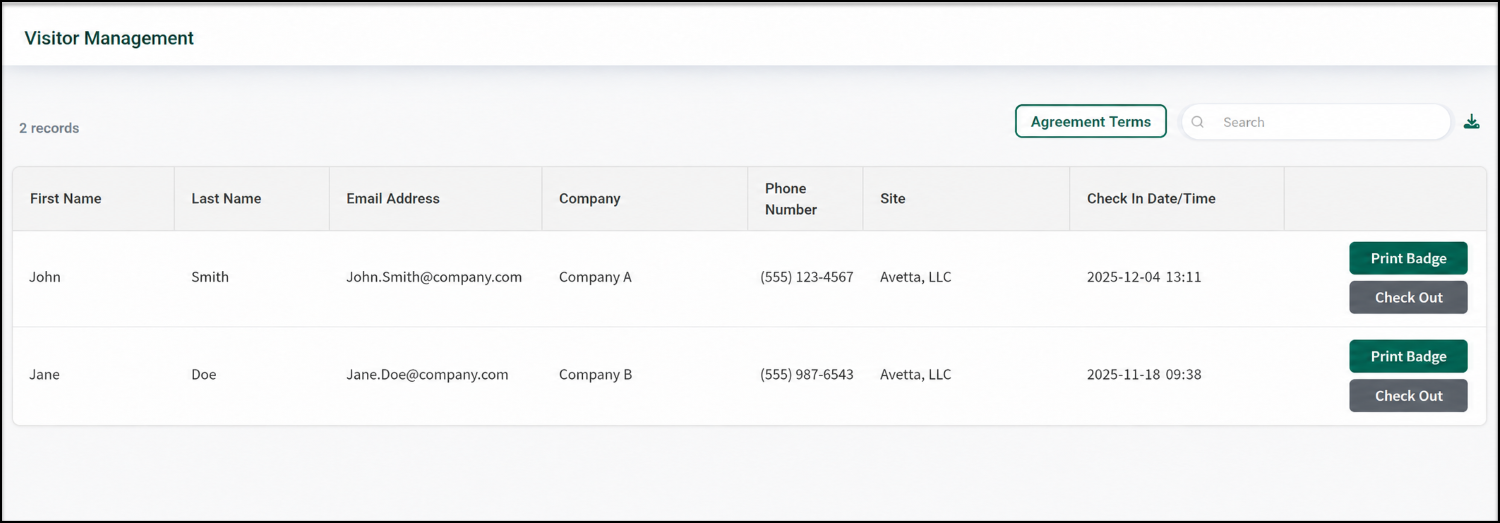
The “Visitor Management” page allows admins to print visitor badges and check them in and out. Here’s how to access the page:
- Click Accounts along the top navigation bar.
- Click Manage Visitors.
- The following visitor information shows:
- First name
- Last name
- Email address
- Company
- Phone number
- Site they are logged into
- Check in date and time
- If you wish to replace the standard legal agreement terms, click Agreement Terms. Anything entered in the free-text box will replace the standard terms that users will agree to at check-in.
Visitors Report
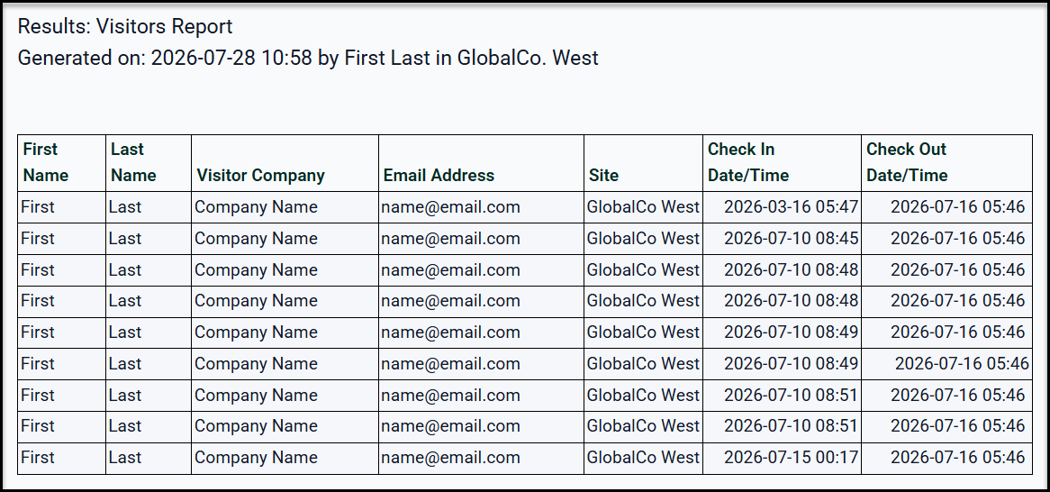
View and download visitor records using the Visitors Report. Results can be filtered by a date range, the visitor's name, company, email address, and the site they visited.
To access:
- Click Accounts > Manage Visitors.
- Click Report.
Or:
- Click Reports.
- Select Visitors Report.
Enter the desired date range and search terms, then select the desired output: screen, export, or email.
Visitor Experience
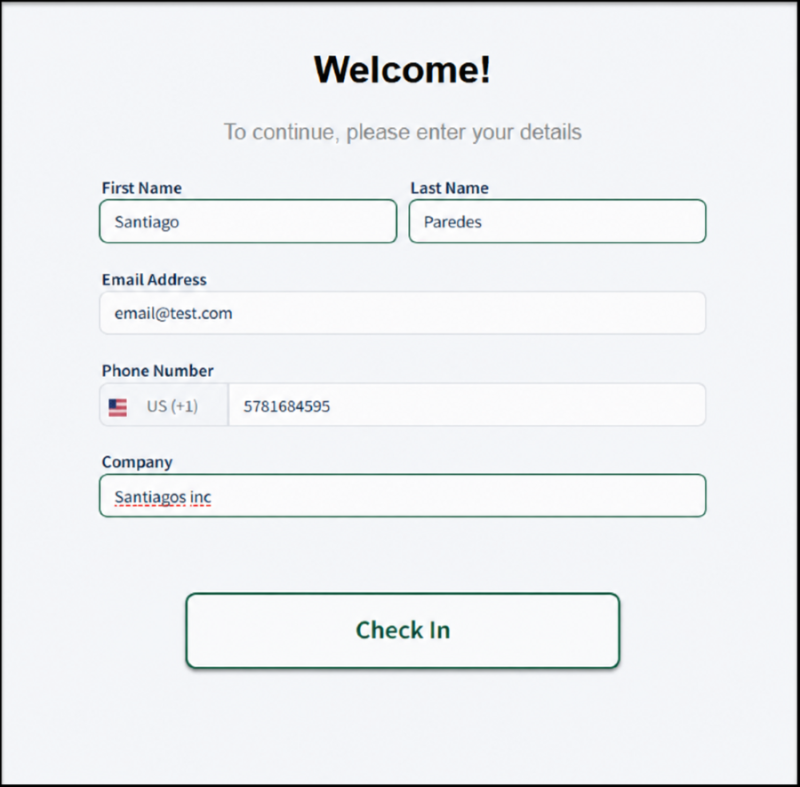
Visitors have a more streamlined entry into the facility with Visitor Management. A “Welcome” screen on the self-service kiosk invites them to check in. Here’s how visitors check in:
- If desired, select a different language from the dropdown menu.
- Tap Check In.
- Enter:
- First Name
- Last Name
- Email Address
- Phone Number
- Company being represented
- Tap Check In again.
- Pick up badge.
- Upon departure, reception staff use the “Check-Out” page to update visitor status.
Frequently Asked Questions (FAQs)
Platform Availability
- Can Visitor Management be enabled without Worker Management configured?
- No. Visitor Management is part of Worker Management.
- Is Visitor Management available in the mobile app?
- No. Visitor Management is currently available on desktop only.
Clients
- How do I set up Visitor Management?
- A Client Administrator with the appropriate Worker Management permissions must complete the initial setup. Administrators can only see and configure terminals within their assigned hierarchy. You are also responsible for providing the kiosk and any required hardware for visitor sign-in.
- What user agreement applies to this feature, given that personal identifying information (PII) is collected?
- A standard user agreement is provided that informs users and captures their consent for the collection of personal information. You may customize this agreement to include your own legal language or compliance requirements within the platform.
- What is required to print visitor badges?
- You simply need a connected printer. Badges are formatted to work with commonly used printers, such as Brother models.
- How are visitor records handled if the same person visits multiple times?
- Each visit generates a separate record. For example, if the same visitor comes four times, four individual records will appear. Records are not currently consolidated by name or email.
- If a visitor also has a Supplier account, will the visit link to their Supplier profile?
- No. Visitor Management and Supplier profiles are not integrated.
- Is reporting available?
- Reporting is currently available through the “Visitor Management” page. Records can be printed to PDF, and all records are included. The data is also accessible via endpoints for additional reporting needs.
- Is there an automatic timeout if a visitor forgets to check out?
- There is currently no automatic timeout for visitors who do not check out.
- Can Visitor Management be used to account for people on site during emergency evacuations?
- This feature should not be used in the event of an emergency evacuation.
- Who will be shown on the list?
- Client Administrators will see a list of everyone who has been checked in to the site, whether they are currently present or not.
BACK TO TOP